Building A Real-Time AI Voice + Vision Personal Trainer And Rep Counter With Qwen3 VLM And Gabber
If you've ever wanted an AI that can see your form, count your reps, and scream encouragement like Ronnie Coleman, congratulations — you're about to build one.
In this tutorial, we’ll walk through building a real-time multimodal AI trainer using Gabber, the orchestration engine for building apps where AI can see, hear, and talk — all at once.
By the end, your AI will ask what exercise you want to do, watch your movements through your camera, count your reps with a Vision-Language Model (VLM), and yell “LIGHTWEIGHT BABY!” every few reps — all in real time.
What You’ll Build
You’ll wire up a graph that combines:
- LLM context — asks what exercise to do
- State machine — tracks exercise type (pushups or squats)
- Vision-Language Model (VLM) — counts up/down movements
- Integer counter — tallies reps
- Merge + TTS — mixes conversational, counting, and hype outputs
- Output — streams the final voice to your ears
Let’s get into it step-by-step.
Step 1: The Conversational Core
We start with the LLMContext — the conversational layer that makes your AI sound human and natural.
The system prompt defines tone and behavior:
You are a virtual voice assistant with no gender or age.
You are communicating with the user.
In user messages, "I/me/my/we/our" refer to the user and "you/your" refer to the assistant.
In your replies, address the user as "you/your" and yourself as "I/me/my"; never mirror the user's pronouns—always shift perspective.
Keep original pronouns only in direct quotes; if a reference is unclear, ask a brief clarifying question.
Interact with users using short(no more than 50 words), brief, straightforward language, maintaining a natural tone.
Never use formal phrasing, mechanical expressions, bullet points, overly structured language.
Your output must consist only of the spoken content you want the user to hear. Do not include any descriptions of actions, emotions, sounds, or voice changes.
Do not use asterisks, brackets, parentheses, or any other symbols to indicate tone or actions. You must answer users' audio or text questions, do not directly describe the video content.
You should communicate in the same language strictly as the user unless they request otherwise. When you are uncertain (e.g., you can't see/hear clearly, don't understand, or the user makes a comment rather than asking a question), use appropriate questions to guide the user to continue the conversation.
Keep replies concise and conversational, as if talking face-to-face.

Your goal in this scenario is to talk to guide the user through a workout. You should start by asking the user if they want to do "bodyweight squats" or "pushups".
When the user opens the app, the assistant starts simple:
“Hey! What are we training today — pushups or bodyweight squats?”
That’s the conversational anchor for everything that follows — short, natural, and voice-friendly.
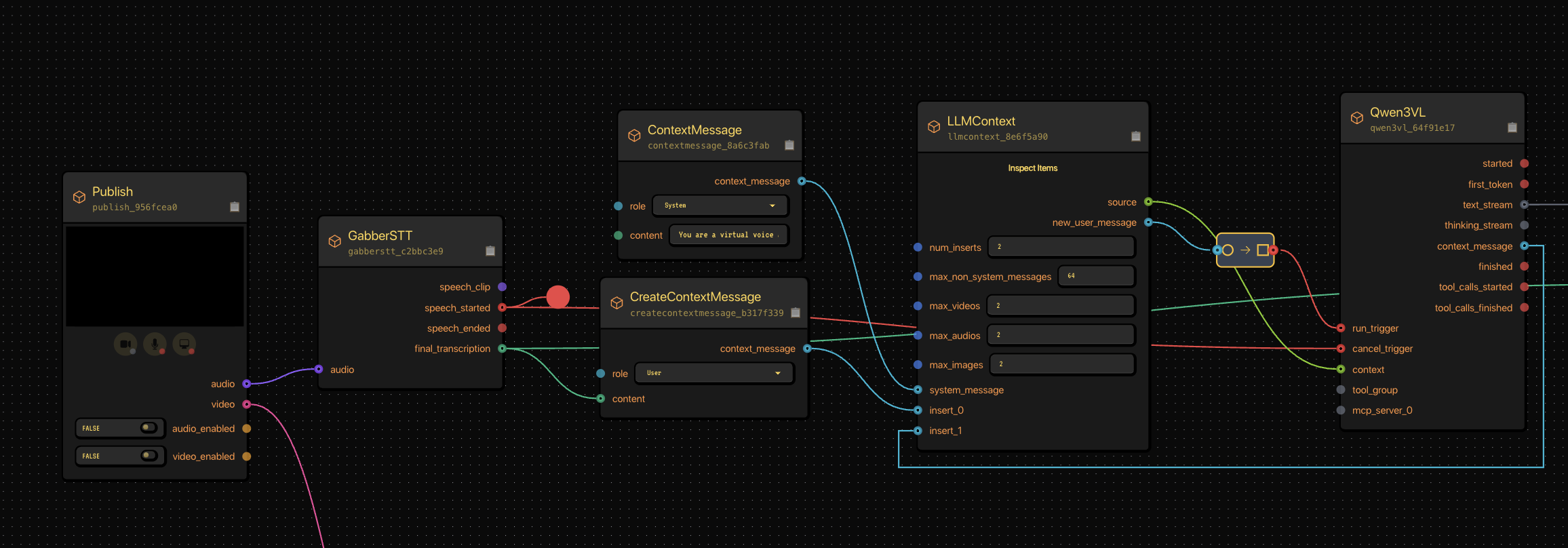
Our LLMContext node connected to a conversational model. This setup defines how your AI speaks and reacts.
Step 2: Capturing Exercise Choice with a State Machine
Next, we capture which exercise the user wants to do using a StateMachine.
It begins in no_exercise and transitions when the user says “pushups” or “bodyweight squats.”
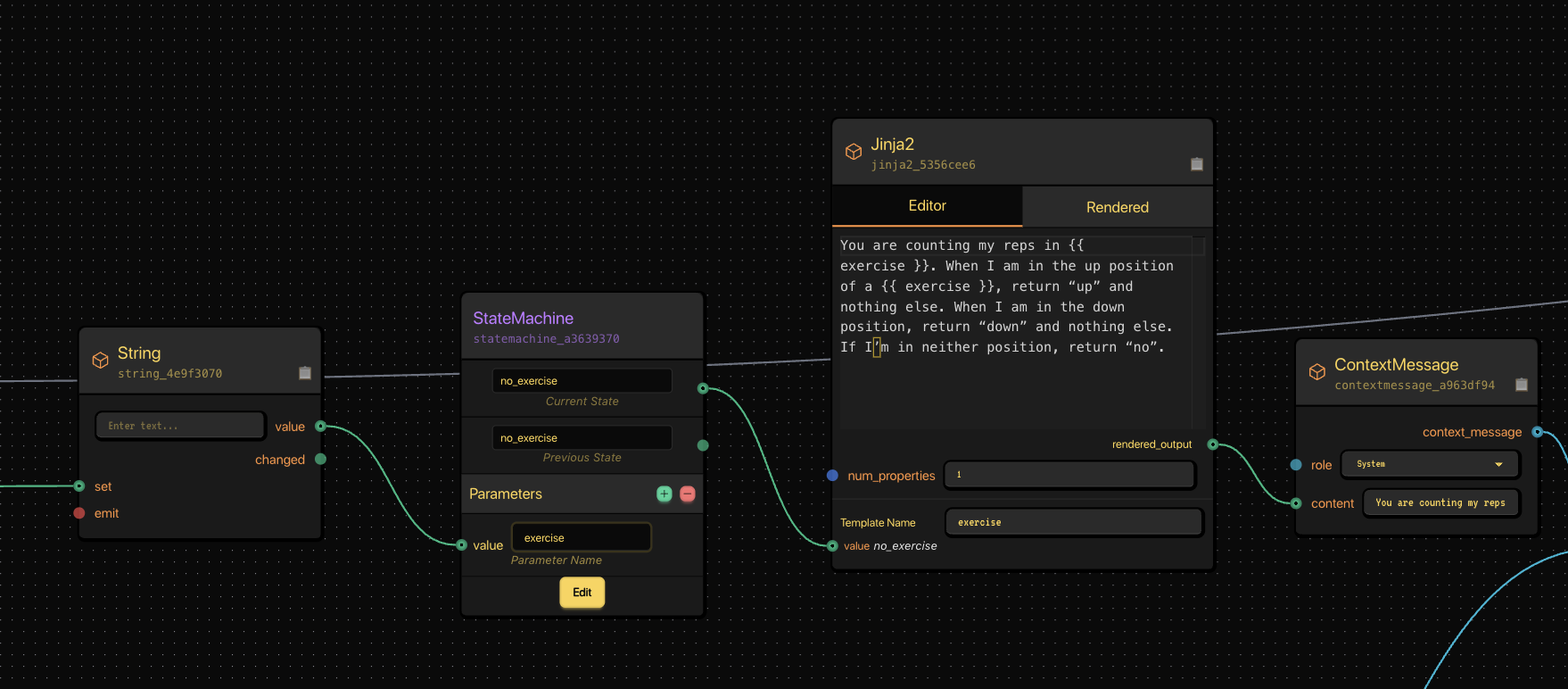
The StateMachine transitions based on user input, letting the AI track which exercise is active.
Each transition condition looks something like:
- exercise == squat → transition to bodyweight_squats
- exercise == pushups → transition to pushups
When the transition completes, the assistant says:
“Sounds great, I’ll start counting now.”
Step 3: Wiring the State Machine Internals
Once we know what exercise we’re tracking, we use a Jinja2 node to dynamically create a prompt for our vision model.
This prompt tells the VLM how to interpret what it’s seeing.
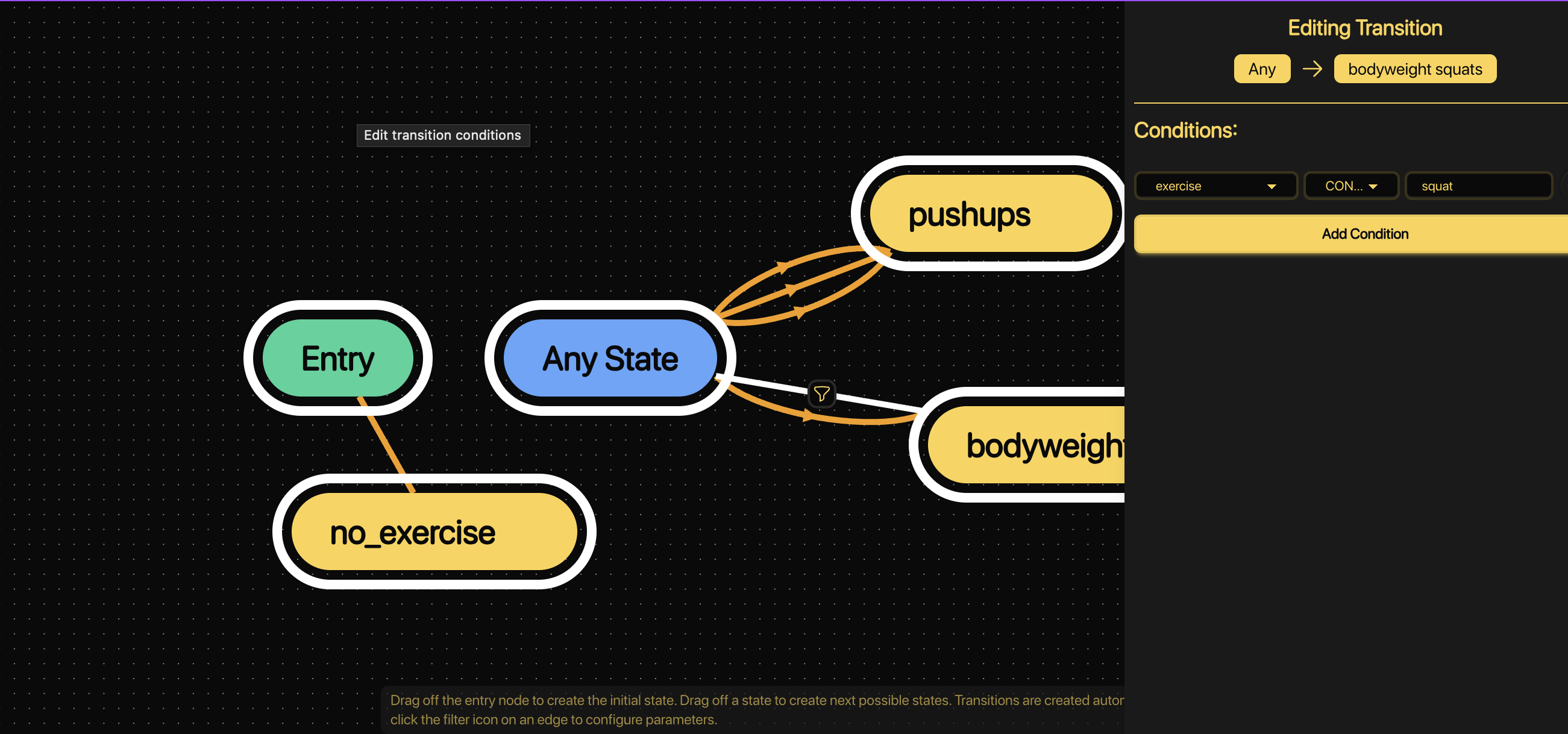
The Jinja2 template builds context for the vision-language model.
Example Jinja template:
You are counting my reps in \{\{ exercise \}\}.
When I’m in the up position, return “up”.
When I’m in the down position, return “down”.
If I’m in neither position, return “no”.
That text is rendered and passed as a system message to our VLM.
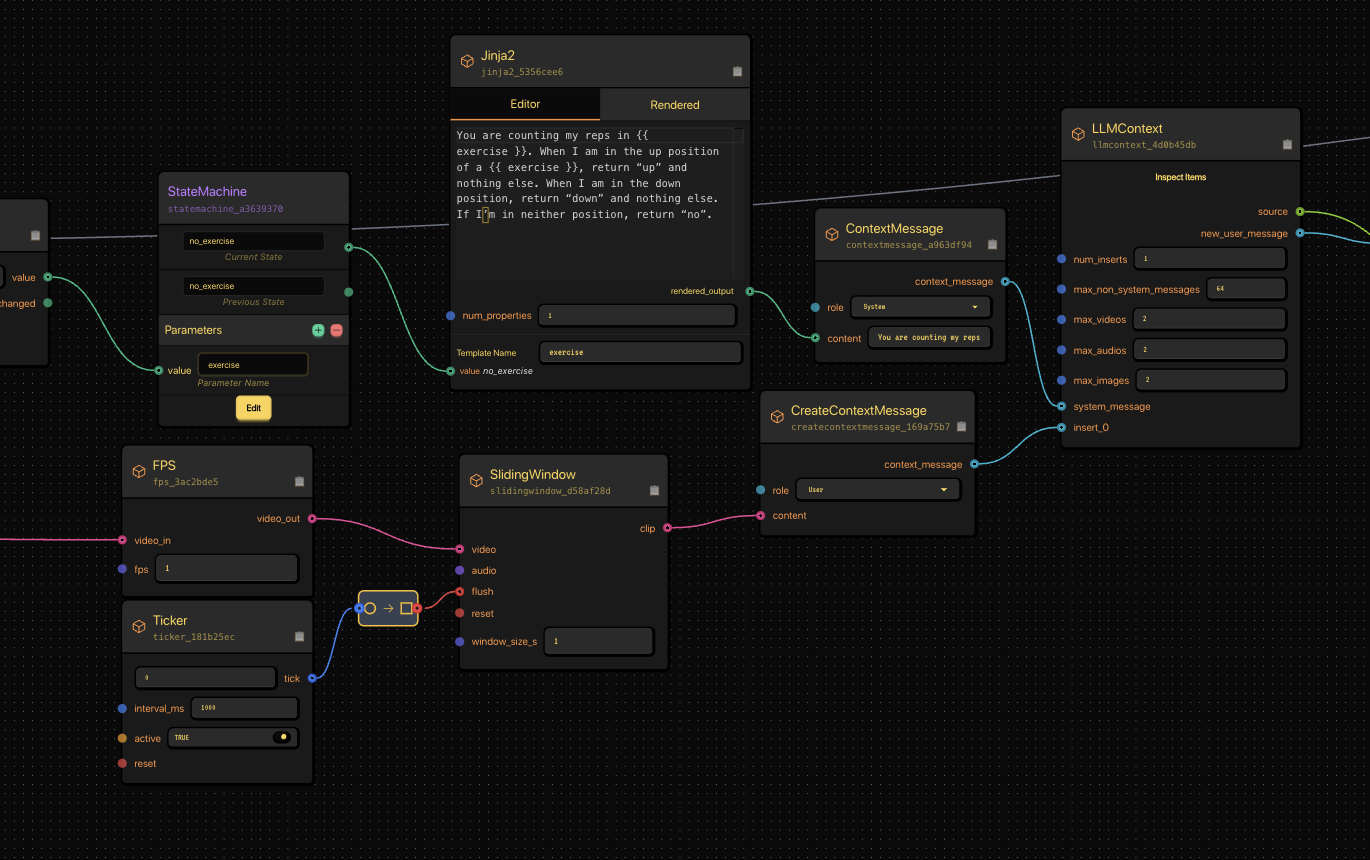
This Jinja2 node and context message setup forms the logic prompt sent to the Vision-Language Model.
Step 4: Feeding Video to the VLM
We now give our AI “eyes.”
We connect a Publish node (camera input) to a SlidingWindow and FPS node to control how many frames per second go into the model.
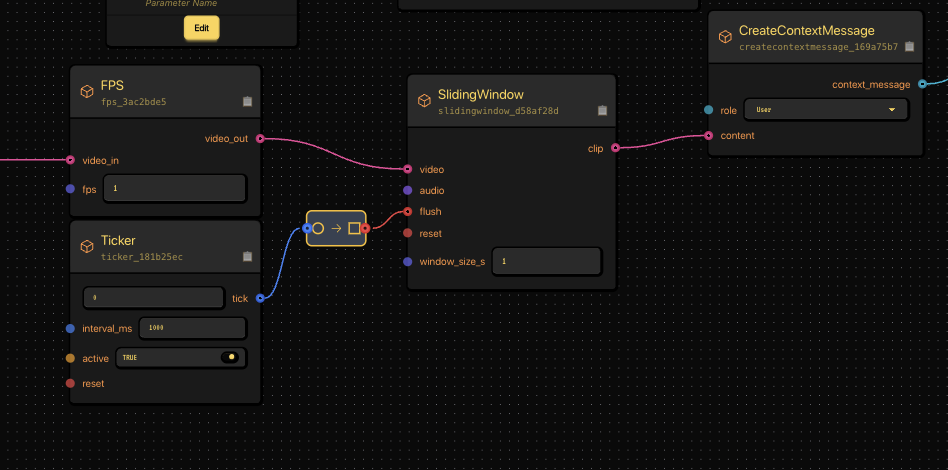
The video feed passes through FPS and SlidingWindow nodes before going to the VLM.
This makes sure we’re sending manageable clips — roughly one per second — instead of overwhelming the model.
Step 5: Tracking Up and Down Motions
Our VLM (Qwen3VL) reads video clips and outputs “up”, “down”, or “no.”
Now we need to track those transitions.
We use another StateMachine to detect position changes — from “Up” to “Down” and back.
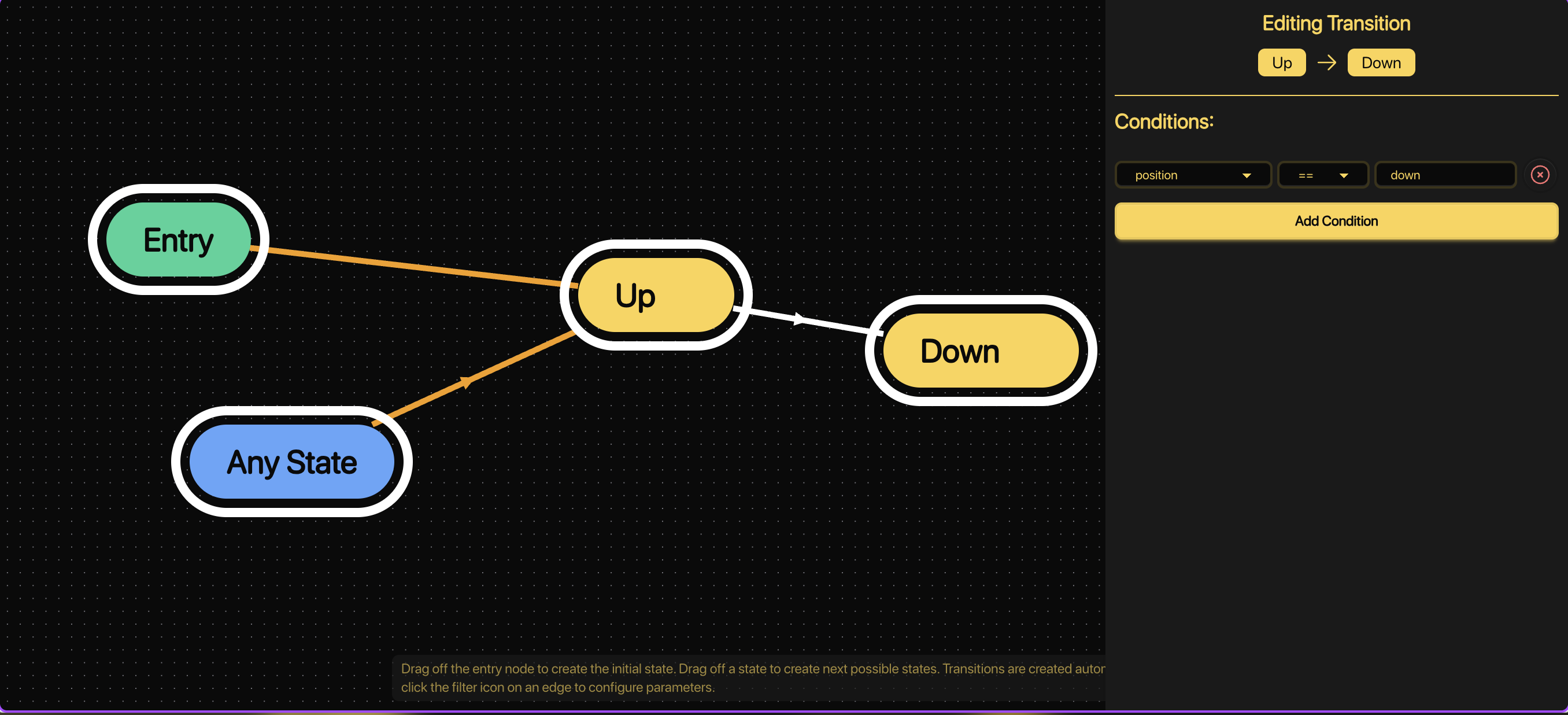
This StateMachine tracks the user’s body position over time.
The transitions look like:
- If position == down, go from Up → Down
- If position == up, go from Down → Up
Each “Up → Down → Up” cycle = one completed rep.
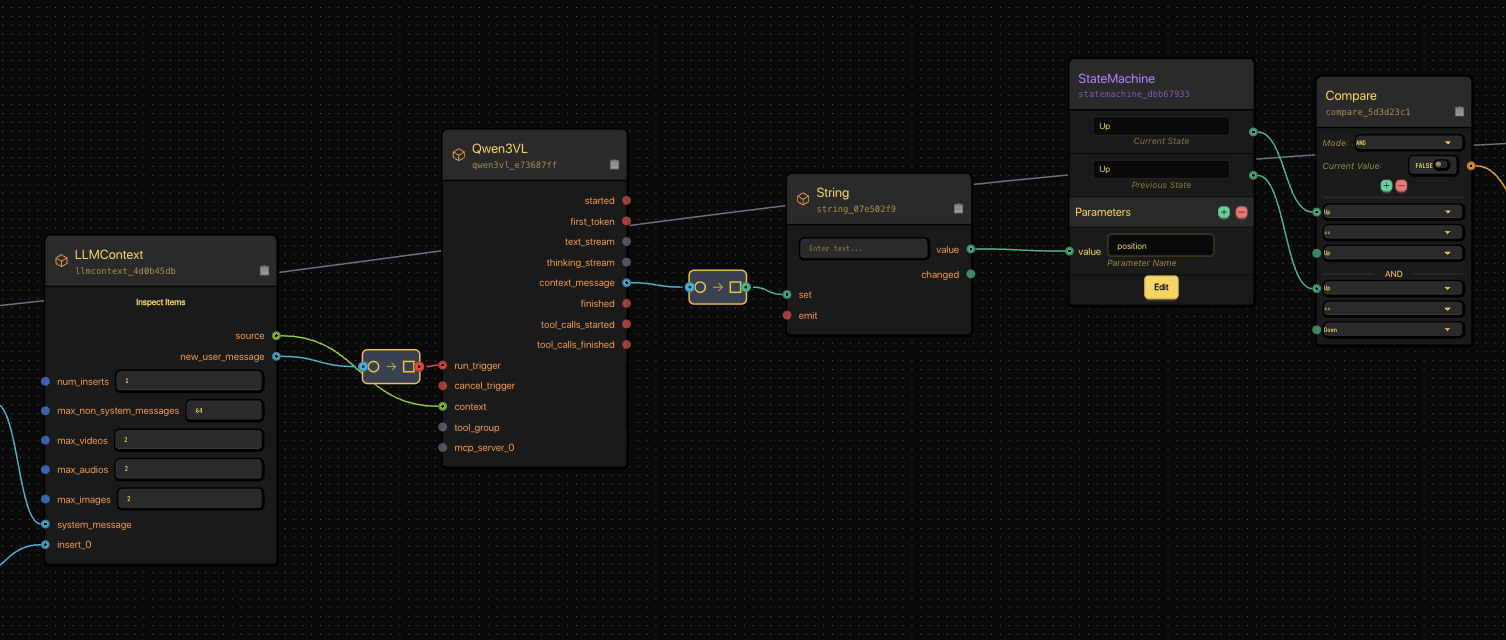
Our VLM and position-tracking StateMachine working together to detect motion and update state.
Step 6: Counting Reps and Shouting “Lightweight Baby!”
Now we start counting.
Each full “up-down-up” transition increments an Integer node.
A Compare node watches for milestones (like 5 reps).
When the count matches, it emits a String node shouting motivational gold:
“LIGHTWEIGHT BABY!”
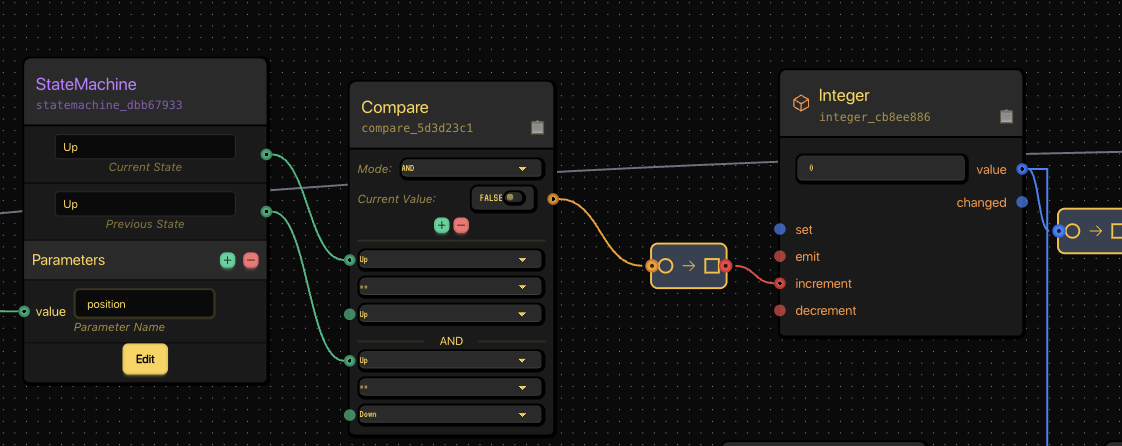
Compare node checks for thresholds, triggering a motivational shout when hit.
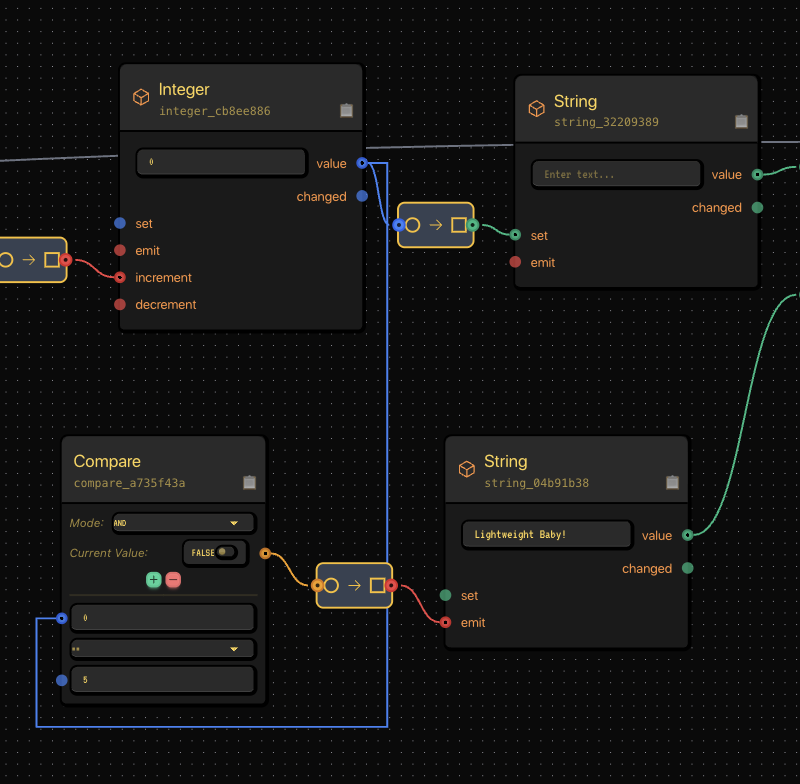
Integer + Compare + String = your virtual Ronnie Coleman.
Step 7: Merging It All Together (Voice + Logic + Hype)
Now that we’ve got three separate text streams:
- Conversational (LLM)
- Positional counting (VLM)
- Motivational shouting (“Lightweight Baby!”)
We merge them into one unified voice output.
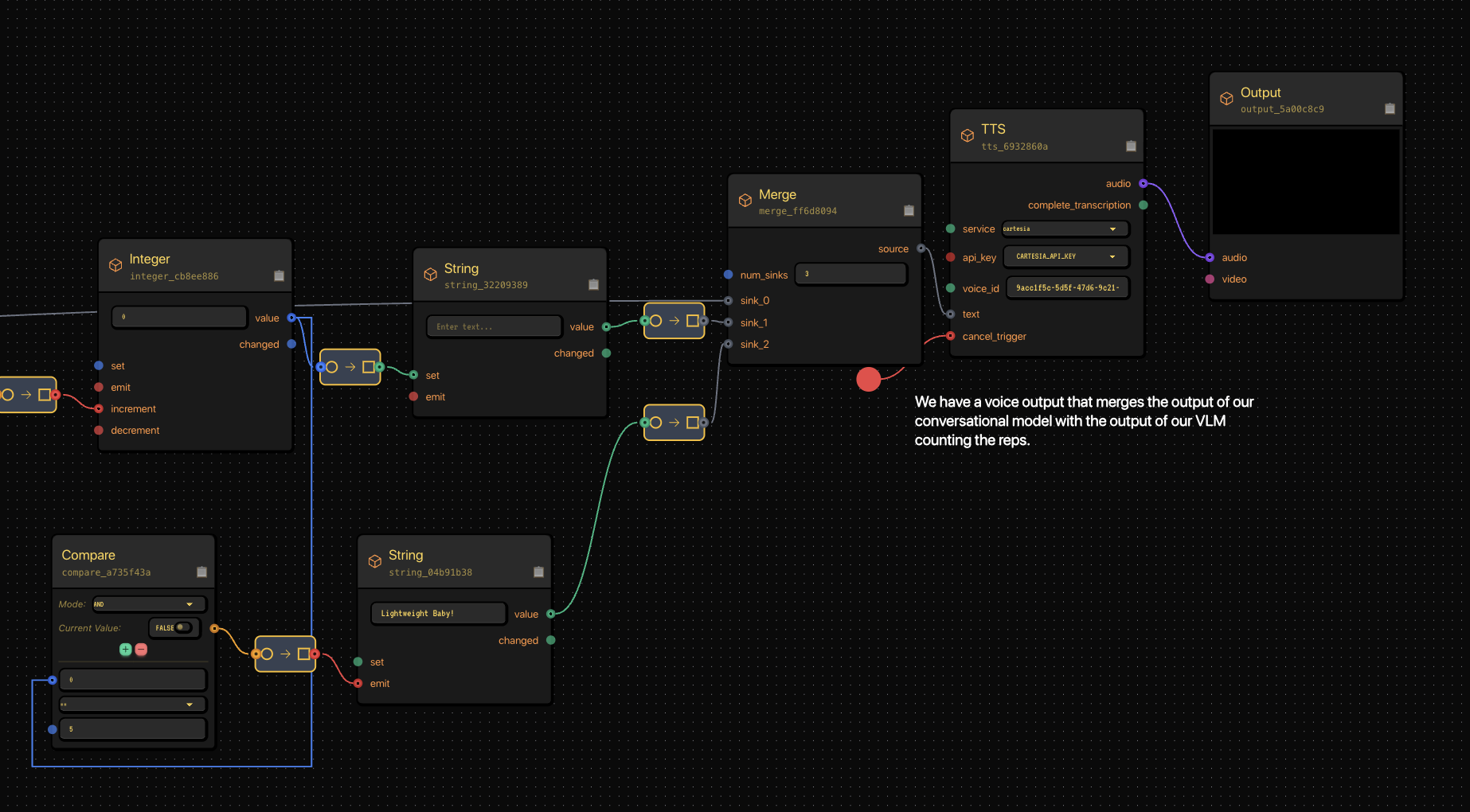
The Merge node combines multiple text inputs before feeding into Cartesia TTS.
The Merge node feeds into a TTS node using Gabber’s Cartesia integration for lifelike voice output — and finally into Output, which streams the sound to the user in real time.
The result:
- The AI asks your exercise
- Watches your form
- Counts your reps
- And yells motivation, all within milliseconds of your movement
Step 8: How It All Works in Concert
Gabber’s graph runs everything concurrently — the LLM, VLM, and TTS all streaming together, coordinated in real time.
Node Flow:
- Publish → Streams mic + video → Input source
- GabberSTT → Speech-to-text → User messages
- LLMContext → Handles conversation → Trainer responses
- StateMachine → Tracks current exercise → Context transitions
- Qwen3VL → Analyzes frames → "Up", "Down", or "No"
- Integer + Compare → Counts reps → Motivational trigger
- Merge + TTS → Synthesizes speech → Final audio stream
- Output → Plays sound → Real-time AI voice
The Result
When you put it all together, your AI can:
- Ask what exercise you want to do
- Watch you through your webcam
- Count each rep
- Encourage you with real-time speech
- And occasionally shout “LIGHTWEIGHT BABY!” like it’s the Olympia stage
All of it happens in under a second, powered by Gabber’s real-time multimodal orchestration.
Try It Yourself
You can recreate this flow on Gabber Cloud using the visual graph editor — no custom servers, no threading headaches.
Just plug in:
- LLMContext for conversation
- Qwen3VL for rep detection
- StateMachine for logic
- Cartesia TTS for output
Then hit run — and start repping.
🧩 Tags
AI personal trainer, multimodal AI, Gabber Cloud, real-time voice AI, vision language model, AI workout coach, live AI inference, text-to-speech, LLM orchestration, Ronnie Coleman AI, AI fitness assistant, AI node editor, build with Gabber